
Running a small business in 2026 means doing more with less. Less time, fewer people, tighter margins. The businesses pulling ahead are not working harder. They are working with better systems.
Business process automation uses software to run repetitive tasks, like follow-up emails, CRM updates, and invoicing, automatically and consistently, freeing small business teams to focus on sales, service, and growth instead of manual admin work.
In this guide, we will cover what it is, what to automate first, which tools to use, and how AI is making automation smarter than it has ever been.
What Is Business Process Automation?
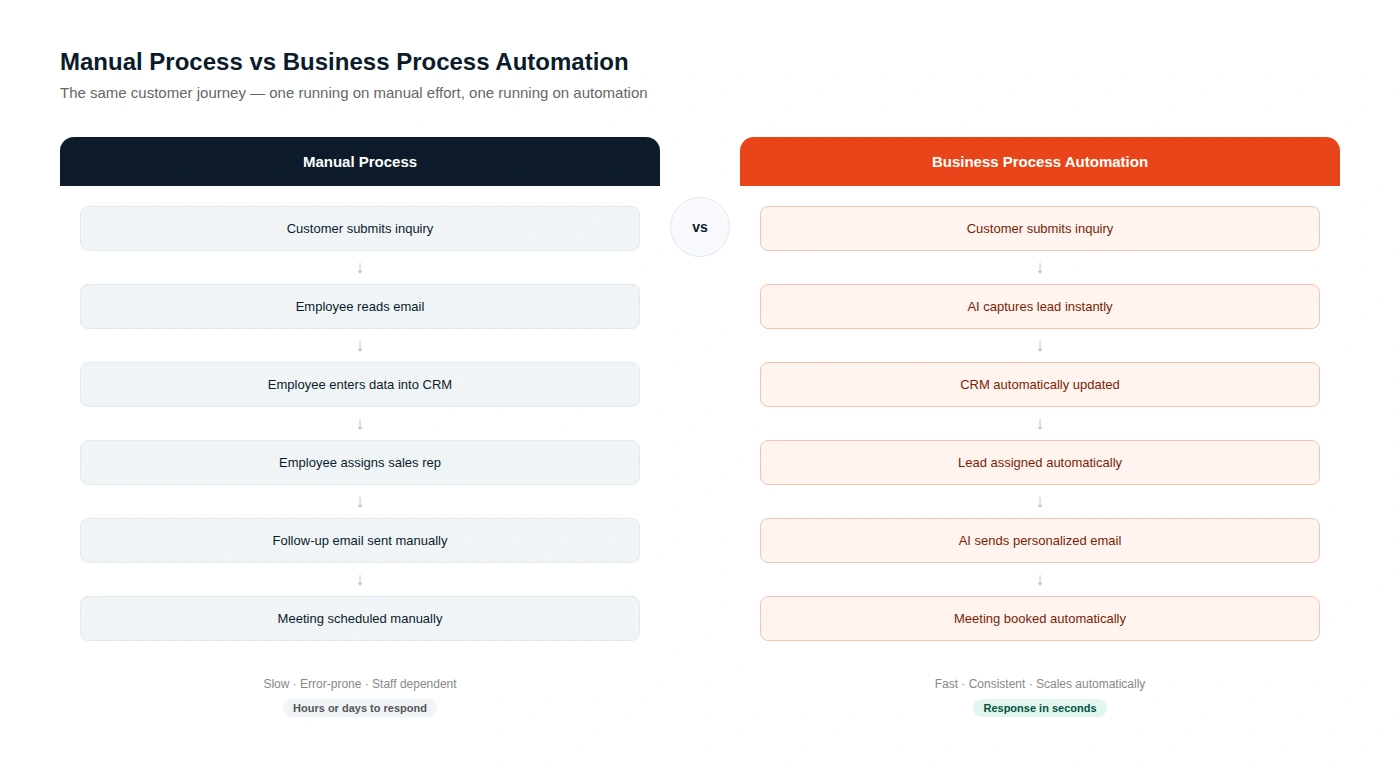
Business process automation, or BPA, is the use of software and technology to perform repetitive business tasks automatically, without requiring a human to do them manually each time. Process automation replaces manual steps in your operations with systems that trigger, execute, and track work on their own.
Business automation covers everything from sending a follow-up email after a form submission, to updating a CRM record when a deal status changes, to generating a monthly sales report without anyone pulling data by hand.
The difference between a manual process and an automated one is not just speed. It is consistency, accuracy, and the ability to scale without adding headcount proportionally.
Why Small Businesses Need Business Process Automation
Small business automation is no longer just for companies with large IT budgets. The tools available in 2026 make automation accessible to businesses with five employees as easily as businesses with five hundred.
The case for operational efficiency through automation comes down to three things.
First, time. Every hour your team spends on data entry, scheduling, manual reporting, or copy-paste tasks is an hour not spent on selling, serving customers, or building the business.
Second, errors. Manual processes produce mistakes. A missed follow-up, a wrong number entered in a spreadsheet, a late invoice. Automation eliminates the human error layer from repetitive tasks entirely.
Third, growth. A business that scales by hiring for every new unit of work hits a ceiling quickly. A business with automated workflows can handle significantly more volume without proportional cost increases.
Top Benefits of Business Process Automation
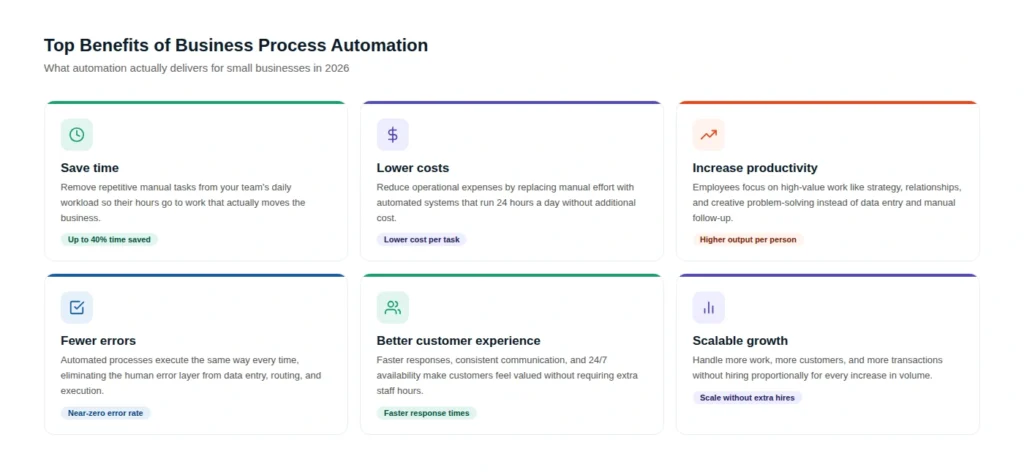
The six core benefits of business process automation for small businesses are time savings from removing repetitive manual tasks, lower operational costs, higher productivity from teams focused on high-value work, fewer errors through consistent automated execution, better customer experiences through faster response times, and scalable growth that does not require hiring for every increase in workload.
Business Processes You Should Automate
Not every business process is worth automating immediately. Start with the tasks that are high-frequency, rule-based, and currently consuming the most time or producing the most errors.
Marketing Automation
Marketing automation handles the repetitive execution work in your marketing programs. This includes email sequences triggered by user behavior, social media post scheduling, lead nurturing campaigns, and ad audience updates based on CRM data.
AI marketing automation goes further by personalizing content delivery based on individual lead behavior, scoring leads based on engagement signals, and adjusting campaign timing dynamically rather than running on a fixed schedule. The marketing automation provides a question of how small businesses can use AI to improve marketing, including how the shift is playing out across social media marketing specifically.
Sales Automation
CRM automation removes the manual data entry burden from your sales team so they spend time selling instead of updating records. Automated lead capture from website forms, automatic deal stage updates triggered by email replies or calls, and pipeline reporting that updates in real time all fall under sales automation.
AI lead qualification takes this further by scoring and routing leads automatically based on predefined criteria, so your sales team focuses their attention on the opportunities most likely to convert.
Customer Support Automation
AI customer support automation handles the first line of customer contact around the clock. This includes chatbots that answer common questions, ticket routing systems that assign support requests to the right team member automatically, and follow-up sequences triggered when a ticket is resolved.
For small businesses that cannot staff a 24-hour support team, support automation directly improves customer experience without adding headcount. VoiceCenta.ai, a platform Alpha Digital has worked with, automates customer communication through both voice and chat, handling inbound queries at scale without requiring coding from the businesses using it.
HR Automation
Employee onboarding automation handles the administrative side of bringing a new hire into the business. Document collection, system access requests, onboarding task assignments, and training reminders can all be triggered automatically from a single hire event in your HR system.
HR automation also covers leave request workflows, performance review scheduling, and payroll data updates, all of which are high-frequency administrative tasks that benefit significantly from removing the manual steps.
Finance Automation
Invoice automation generates, sends, and tracks invoices based on completed milestones or recurring billing schedules. Accounting automation reconciles payments, flags overdue accounts, and generates cash flow reports without requiring someone to export and format data manually.
For small businesses where the owner or a single finance person manages all billing, finance automation recovers significant time each month and reduces the risk of billing errors or missed follow-up on overdue accounts.
Reporting Automation
Automated reports pull data from your CRM, marketing platform, ad accounts, and finance tools and compile them into a consistent format on a scheduled basis. Instead of spending hours building reports, your team reviews them.
Reporting automation also enables real-time dashboards that update continuously, so the information your team makes decisions from is always current rather than reflecting last month’s manual export.
YourHRToolkit: A Real-World Example of HR Automation at Work
One of the clearest examples of HR automation built properly is YourHRToolkit, an AI-powered HR platform Alpha Digital worked with (see our full case study), built specifically for Australian small and mid-size businesses.
Most small business owners in Australia manage their entire HR function without any formal training. They handle hiring, onboarding, performance issues, pay decisions, and compliance obligations while also running the business. The risk is real: Australian workplace law covers Fair Work requirements, National Employment Standards, leave entitlements, and specific documentation requirements for warnings and exits. Getting any of it wrong creates legal exposure.
YourHRToolkit addresses this by deploying eight specialist AI agents, each built for a specific part of the employee lifecycle. Rather than one generic HR chatbot, the platform gives business owners a dedicated agent for recruitment and onboarding, one for managing underperformance, one for policies and compliance, one for pay and performance reviews, one for culture building, and one for everyday leadership support. Each agent delivers practical, compliance-aware guidance specific to the situation the user brings to it.
Best Business Process Automation Tools in 2026
The right workflow automation software depends on your existing tech stack, your technical comfort level, and the complexity of the processes you want to automate.
Zapier connects over 6,000 apps and is the most accessible starting point for small businesses new to automation. Best for straightforward trigger-action workflows between existing tools.
Make (formerly Integromat) offers more complex multi-step workflows with greater control over data transformation. Better suited for teams with slightly more technical experience.
HubSpot combines CRM, marketing automation, and sales automation in one platform. Strong choice for businesses that want integrated automation without managing multiple tools.
Monday.com and Asana offer workflow automation within project management contexts, including task assignment, status updates, and deadline notifications.
n8n is an open-source workflow automation platform that gives technical teams full control over custom automation logic, including AI integrations and self-hosted deployment.
Custom AI automation built specifically around your business processes delivers the highest ROI for businesses with unique workflows that off-the-shelf tools cannot fully address.
How AI Makes Business Process Automation Smarter
AI workflow automation is different from traditional rule-based automation in one important way: it can handle situations that do not fit a predetermined rule.
Traditional automation executes fixed logic. If this happens, do that. AI business automation learns from patterns, makes decisions based on probability, and improves over time. It can classify an incoming support ticket by topic and urgency without being told exactly what words to look for. It can prioritize leads based on behavioral signals rather than a static checklist. It can generate a personalized email response based on context rather than pulling from a fixed template library. Artificial intelligence services go deeper into how these systems are built.
In practice, AI automation services combine the reliability of rule-based workflow automation with the adaptability of machine learning. The result is business automation that handles edge cases, scales with increasing complexity, and gets more effective as it processes more data.
For small businesses, the most immediately useful AI automation applications are lead qualification and routing, customer support triage, dynamic email personalization, and automated reporting with natural language summaries that explain what the data means rather than just showing the numbers.
Business Process Automation Examples
The best way to understand what automation delivers is to see it in action across real business functions. Alpha Digital has documented twelve specific AI automation use cases drawn from real implementations. Here is how they map to the process categories covered in this guide.
Sales And Lead Management
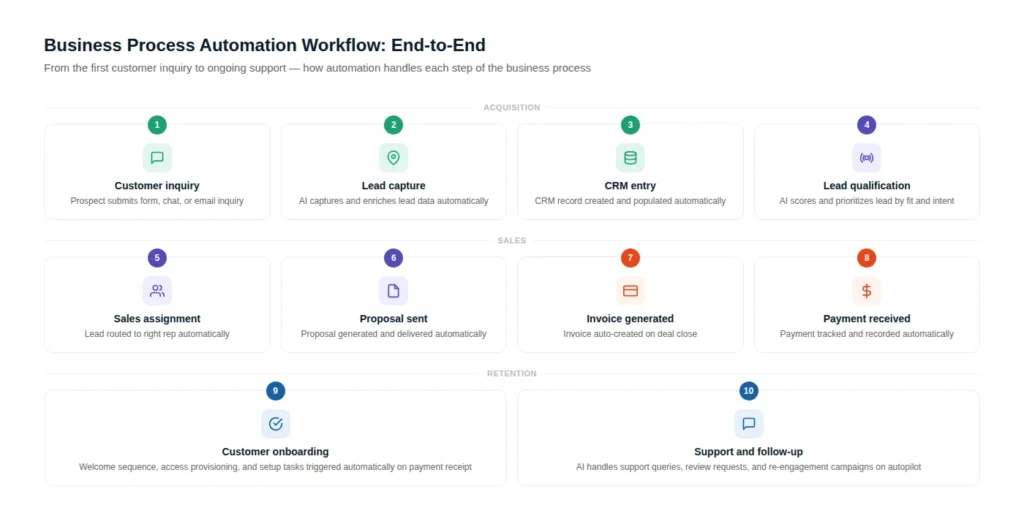
Sales is where most businesses start. AI lead qualification scores and routes incoming leads automatically based on fit and intent signals, so your sales team focuses on the opportunities most likely to close. This connects directly to CRM and email integration, which keeps contact records updated in real time as leads move through your pipeline without any manual data entry. The marketing and sales integration use case shows how both sides of that funnel connect into a single automated workflow from first touch to closed deal.
Finance and Accounting Automation
Finance is one of the highest-ROI areas for automation. The AI invoice processing use case removes manual invoice creation and follow-up entirely, triggering generation on deal close and chasing overdue payments automatically. The invoice and accounting integration example shows how this connects to your accounting platform so reconciliation happens without an extra step from your finance team.
Customer Support Automation
Customer support is where AI automation delivers the most visible customer experience improvement. The AI support ticket routing use case classifies incoming requests by topic and urgency, then assigns them to the right team member automatically. The support ticket and CRM sync use case ensures that every resolved ticket updates the customer record, giving your team a full picture of the relationship without manual logging.
Internal Communications Automation
Internal communications benefit from automation too. The AI email triage use case sorts, prioritizes, and routes incoming email automatically so high-priority messages never get buried in a full inbox.
HR and Onboarding Automation
HR and onboarding is a natural fit for automation given how rule-based and repetitive the process is. The AI onboarding automation use case triggers document requests, system access provisioning, equipment ordering, and training schedules from a single hire event. The HR and onboarding integration use case shows how this connects to your HR platform and payroll system so the whole process runs without manual coordination.
Reporting Automation
Reporting is where teams often lose the most time. The AI reporting automation use case pulls data from your CRM, ad platforms, and finance tools to generate consistent reports on a schedule, while the reporting and data integration use case shows how multiple data sources connect into a single source of truth so dashboards stay current without anyone exporting spreadsheets manually.
Platforms like Clipper AI, Vikk AI, and VoiceCenta.ai that Alpha Digital has supported all integrate automation into their core workflows to handle high volumes of user interaction without proportional increases in operational cost.
The automation infrastructure is what allows these platforms to serve hundreds or thousands of users without a support team that scales linearly.
Common Mistakes Businesses Make With Automation
Automating a broken process.
Automation makes fast what already exists. If the underlying process is poorly designed, automation makes the problems happen faster and at greater scale. Fix the process first, then automate it.
Starting too big.
Businesses that try to automate everything simultaneously typically end up with poorly implemented automations across multiple systems. Start with one or two high-impact processes, get them working well, then expand.
No human oversight layer.
Full automation without any review mechanism creates blind spots. The best automation strategies include monitoring, exception handling, and regular audits to catch issues before they compound.
Ignoring integration requirements.
Automation between disconnected tools requires integration work. Assuming that two platforms will connect easily without verifying their integration capabilities leads to broken workflows and data inconsistencies.
Choosing tools before defining needs.
Selecting automation software based on brand recognition rather than specific workflow requirements results in either over-engineered solutions or platforms that cannot handle the actual use case.
How to Choose the Right Business Process Automation Solution
The right automation solution depends on where you are starting from and where you want to go.
If you have no automation in place and want a starting point, begin with a single high-frequency, rule-based process and use an accessible tool like Zapier or HubSpot’s built-in workflows. Prove the concept, measure the time saved, and expand from there.
If you have some automation in place but it is fragmented across disconnected tools, the priority is integration. Getting your CRM, marketing platform, finance system, and support tools talking to each other consistently is often more valuable than adding new automations on top of disconnected systems.
If you need custom AI automation that goes beyond what off-the-shelf tools can deliver, working with a specialist team that builds and maintains automation infrastructure around your specific business logic is the right path.
Our AI Automation Services page covers what Alpha Digital builds for clients across industries. If you want to discuss your specific situation, contact our team directly.
Why Choose Alpha Digital for Business Process Automation?
| Feature | DIY Tools | Traditional Agencies | Alpha Digital |
| AI strategy | No | Limited | Yes |
| Custom AI workflows | No | Yes | Yes |
| CRM integration | Partial | Yes | Yes |
| ERP integration | No | Partial | Yes |
| AI chatbots | Partial | Partial | Yes |
| AI voice agents | No | No | Yes |
| Workflow automation | Partial | Yes | Yes |
| Custom development | No | Partial | Yes |
| Ongoing support | No | Partial | Yes |
The Future of Business Process Automation
The direction of intelligent automation in 2026 points clearly toward systems that do more than execute fixed rules.
Agentic AI, where software agents make decisions and take multi-step actions autonomously, is moving from experimental to practical for business applications. This means automation systems that do not just trigger a pre-defined sequence but assess a situation, choose an appropriate action from a range of options, execute it, and report back.
Hyper-personalization at scale is becoming achievable through AI automation. Every customer interaction, from a support response to a marketing email to a sales follow-up, can be individually tailored based on real context rather than segment-level assumptions.
Integration intelligence is improving too. The next generation of automation platforms are better at bridging gaps between tools that were not designed to work together, reducing the technical overhead of building connected workflows across complex tech stacks.
For small businesses, the practical implication of all of this is that the automation capabilities available in 2026 are significantly more powerful and more accessible than they were even two years ago. The window for gaining a competitive advantage through better automation is open now, and will close as these tools become the baseline rather than the differentiator.
Final Thoughts
Business process automation is not about replacing your team. It is about giving your team better tools so the hours they spend go toward work that actually moves the business forward.
The small businesses that build strong automation foundations now, whether through accessible workflow tools or custom AI systems, will have a meaningful structural advantage over those still running on manual processes. The cost of good automation is now lower than the cost of not having it.
Explore our AI Automation Services to see what Alpha Digital builds for businesses at every stage of their automation journey. Or contact our team to discuss what the right starting point looks like for your business specifically.
Frequently Asked Questions
What is business process automation?
Business process automation is the use of software to perform repetitive business tasks automatically, without manual effort at each step. It replaces manual execution of routine processes with systems that trigger, run, and track work on their own. Examples include automated email follow-ups, CRM updates, invoice generation, report creation, and customer support triage across multiple business functions.
Why is business process automation important?
Business process automation is important because it frees up human time for high-value work, reduces errors in repetitive tasks, lowers operational costs, and allows businesses to scale without hiring proportionally for every increase in workload. For small businesses especially, automation multiplies the output of a small team without requiring the budget of a larger one.
How does AI improve business process automation?
AI improves business process automation by handling situations that do not fit fixed rules. Traditional automation executes predetermined logic. AI automation learns from patterns, makes probability-based decisions, and improves over time. This means AI-powered workflows can classify, prioritize, personalize, and route based on context, not just rigid triggers, making them more effective across a wider range of real-world situations.
Which business processes should be automated first?
Automate the processes that are highest frequency, most rule-based, and currently consuming the most time or producing the most errors. Common starting points include lead capture and CRM entry, email follow-up sequences, appointment scheduling, invoice generation, and monthly reporting. Start with one process, implement it well, measure the result, and expand from there.
What is the difference between BPA and workflow automation?
Business process automation refers broadly to automating entire business processes end to end. Workflow automation typically refers to automating specific sequences of tasks within a process. BPA is the larger strategic concept; workflow automation is often one of the tools used to achieve it. In practice, the terms are used interchangeably across most business contexts.
How much does business process automation cost?
Costs range from free or low-cost for basic automation tools like Zapier’s entry tiers, to several hundred dollars per month for mid-market platforms, to custom development investments of $5,000 to $50,000 or more for complex AI-powered automation built specifically around a business’s unique workflows. The right investment depends on your process complexity, integration requirements, and the value of the time you are automating away.
Which automation software is best for small businesses?
For most small businesses starting with automation, Zapier is the most accessible entry point due to its broad app compatibility and no-code interface. HubSpot is the best choice for businesses that want CRM, marketing, and sales automation integrated. Make is better for more complex multi-step workflows. Custom AI automation built by a specialist team delivers the highest ROI when off-the-shelf tools cannot handle the specific workflow requirements. see our best AI automation services for small and medium businesses for a closer comparison.
Can small businesses use AI automation?
Yes. AI automation tools are now accessible to small businesses without large IT teams or technical backgrounds. No-code and low-code AI tools, combined with specialist services that implement custom AI workflows, mean a business of any size can benefit from AI-powered automation. The most practical starting points for small businesses are AI lead qualification, AI customer support responses, and AI-driven email personalization within existing marketing platforms.



3 Comments